Playing Detective
Exploring the hardware for Schemium this last month
Recap
So previously I had given up on trying to get this hardware to work since I was incapable of figuring out why I wasnt able to get my simple design booting working. Now a month later, I am able to fully utilize this board and take control of it completely. I am now able to put my own designs into the board and boot up a custom bare minimum linux. Here is how I did it!!
Interogating the Zynq
So it turns out that through the use of the jtag interface and the xsct tools provided by xilinx, it is possible to overwrite the zynq and take control of the processor and fabric through jtag commands. To do this, all you have to do is source your xilinx tools and start up the xcst tools by typing xcst. The fpga does need to be plugin through the jtag interface too.
The following commands were then what I used to start flashing the chip with my artifacts from my yocto build that I had made previously.
1
2
3
4
5
6
7
8
9
10
11
12
13
14
15
# start up hardware server
connect
targets

# load in fpga fabric
targets 4
fpga ./download-schemium.bit

# load fsbl
targets -set -nocase -filter {name =~ "arm*#0"}
stop
dow ./fsbl-schemium.elf

# start
con
By spamming this sequence I was able to learn a few things. My fabric was programmable and it seemed like my first stage boot loader was correct for the most part. I also learned that it was possible to program code into the qspi so I took a good at it using:
program_flash -f boot.bin -offset 0 -flash_type qspi_single -fsbl fsbl-schemium.elf
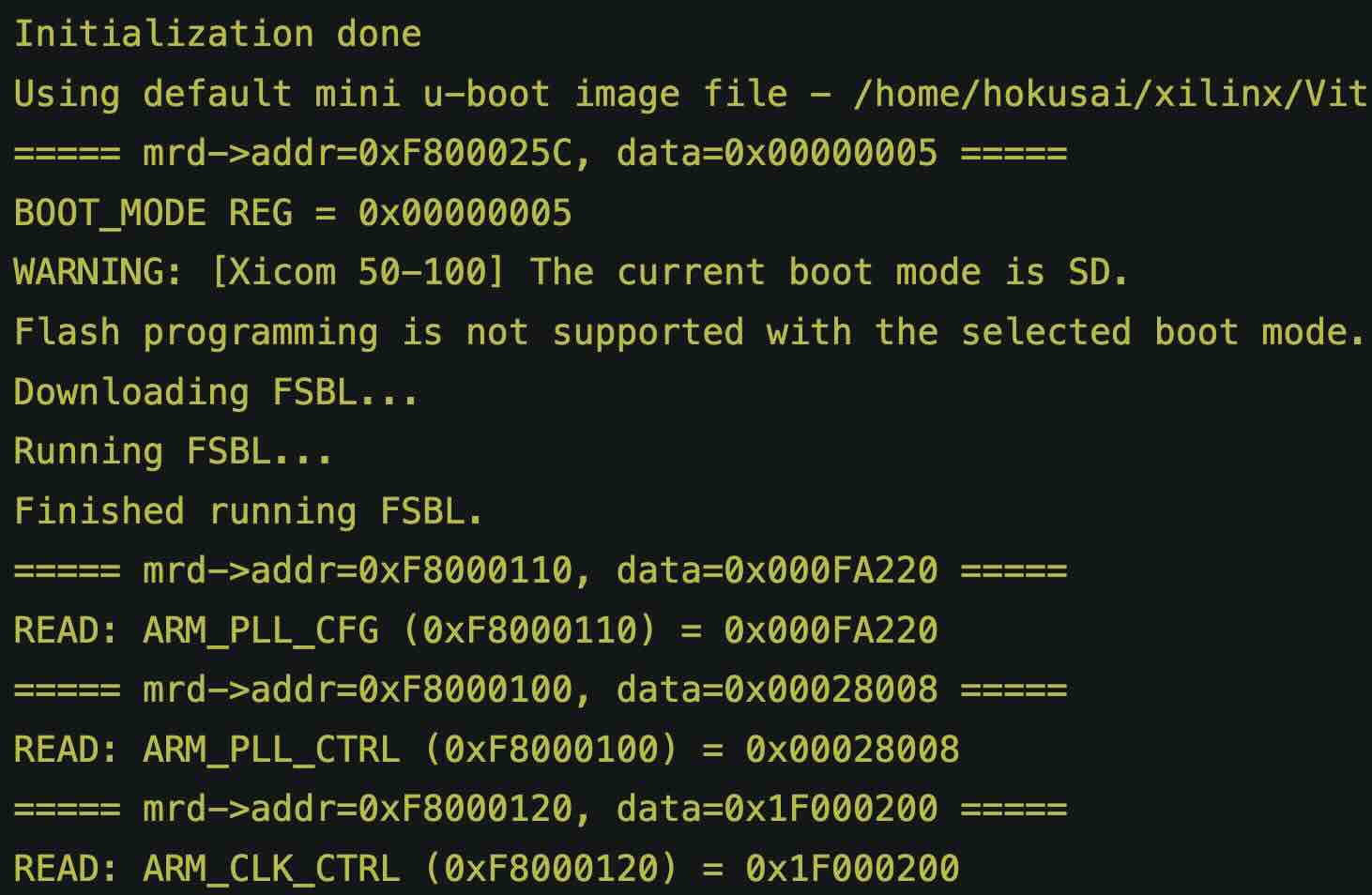
This is when I made my ground breaking discovery, I just so happened to have the pins for the boot as both high since I was randomly playing around with them. Then when I hit that command, I got a very interesting response:
1
2
3
4
5
6
7
8
9
10
11
12
13
14
15
16
17
18
19
20
21
22
23
24
25
26
27
28
29
30
31
32
33
34
35
36
37
38
39
40
41
42
43
44
45
46
47
48
49
hokusai@hokusai:~/schemium/os/build/tmp/deploy/images/schemium$ program_flash -f boot.bin  -offset 0 -flash_type qspi_single -fsbl fsbl-schemium.elf

****** Program Flash
****** Program Flash v2023.2 (64-bit)
  **** SW Build (by xbuild) on 2023-10-09-15:37:40
    ** Copyright 1986-2022 Xilinx, Inc. All Rights Reserved.
    ** Copyright 2022-2023 Advanced Micro Devices, Inc. All Rights Reserved.


WARNING: Failed to connect to hw_server at TCP:localhost:3121
Attempting to launch hw_server at TCP:localhost:3121

Connected to hw_server @ TCP:localhost:3121

Target not specified. Selecting target_id 2 (arm_dap) by default.

Retrieving Flash info...

Initialization done
Using default mini u-boot image file - /home/hokusai/xilinx/Vitis/2023.2/data/xicom/cfgmem/uboot/zynq_qspi_x4_single.bin
===== mrd->addr=0xF800025C, data=0x00000005 =====
BOOT_MODE REG = 0x00000005
WARNING: [Xicom 50-100] The current boot mode is SD.
Flash programming is not supported with the selected boot mode.If flash programming fails, configure device for JTAG boot mode and try again.
Downloading FSBL...
Running FSBL...
Finished running FSBL.
===== mrd->addr=0xF8000110, data=0x000FA220 =====
READ: ARM_PLL_CFG (0xF8000110) = 0x000FA220
===== mrd->addr=0xF8000100, data=0x00028008 =====
READ: ARM_PLL_CTRL (0xF8000100) = 0x00028008
===== mrd->addr=0xF8000120, data=0x1F000200 =====
READ: ARM_CLK_CTRL (0xF8000120) = 0x1F000200
===== mrd->addr=0xF8000118, data=0x001452C0 =====
READ: IO_PLL_CFG (0xF8000118) = 0x001452C0
===== mrd->addr=0xF8000108, data=0x0001E008 =====
READ: IO_PLL_CTRL (0xF8000108) = 0x0001E008
Info:  Remapping 256KB of on-chip-memory RAM memory to 0xFFFC0000.
===== mrd->addr=0xF8000008, data=0x00000000 =====
===== mwr->addr=0xF8000008, data=0x0000DF0D =====
MASKWRITE: addr=0xF8000008, mask=0x0000FFFF, newData=0x0000DF0D
===== mwr->addr=0xF8000910, data=0x000001FF =====
===== mrd->addr=0xF8000004, data=0x00000000 =====
===== mwr->addr=0xF8000004, data=0x0000767B =====
MASKWRITE: addr=0xF8000004, mask=0x0000FFFF, newData=0x0000767B
Problem in running uboot
Flash programming initialization failed.

ERROR: Flash Operation Failed
The key line here is, “WARNING: [Xicom 50-100] The current boot mode is SD” . Some how luckly I was in the boot mode for the sd card and now I had proof of this!!
Reconstructing Constraints
So now that I had confirmation that I was actually able to use the sdcard for booting, it was clear that somehow my fabric did not have the right capabilities to use the board and the pin outs. So utilizing the schematics that I was able to get of the server, I started reverse engineering the constraint file.
Knowing that the pluto firmware from the AD Pluto radio was somewhat compatible with this board, I figured that I could copy the constraints for the pluto and just update the pins to match the wiring. This was a painful and boring process but I learned alot so it was worth it. Here is an example of one of the many translation tables I ended up making to map out my new constraint file:
graph LR
    subgraph Zynq_7010_Bank_34 RX
        B1[L12<br>N13<br>H14<br>J13<br>G14<br>H13<br>G12<br>H12<br>G11<br>J14<br>J15<br>K15<br>H11<br>J11]
    end

    classDef spacer fill-opacity:0,stroke-width:0;

    subgraph Radio stuff
        subgraph AD9363 fabric
            fabRX[rx_clk_in<br>rx_frame_in<br>rx_data_in_0<br>rx_data_in_1<br>rx_data_in_2<br>rx_data_in_3<br>rx_data_in_4<br>rx_data_in_5<br>rx_data_in_6<br>rx_data_in_7<br>rx_data_in_8<br>rx_data_in_9<br>rx_data_in_10<br>rx_data_in_11]
        end
        subgraph AD9363 hw
            RXPins[J6<br>G8<br>K11<br>J12<br>K10<br>J11<br>K9<br>J10<br>K8<br>J9<br>K7<br>J8<br>J7<br>H8]
        end

        fabRX --- RXPins
    end

    subgraph Zynq_7020_bank_34_RX
        B2[Y6<br>W16<br>AB20<br>AB19<br>AB21<br>AA21<br>Y21<br>Y20<br>AB22<br>AA22<br>W21<br>W20<br>V20<br>U20]
    end

    B1 -- LVCMOS18 --- fabRX
    RXPins --LVCMOS18--- B2
Whats crazy is that this actually worked!!
Mending a Broken Tree
Now that I was able to spin up the board through the sd card but I was running into a new problem. During the booting logs, I found this new kernel panic.
1
2
3
4
5
6
7
8
9
10
11
12
13
14
15
16
17
18
19
20
21
22
23
24
25
26
27
28
29
30
31
32
33
34
35
36
37
38
39
40
41
42
43
44
45
46
47
48
49
50
51
52
53
54
55
56
57
58
59
60
61
62
63
64
65
66
67
68
69
70
71
72
73
74
75
76
77
78
79
80
81
82
can: broadcast manager protocol
can: netlink gateway - max_hops=1
Registering SWP/SWPB emulation handler
e0001000.serial: ttyPS0 at MMIO 0xe0001000 (irq = 46, base_baud = 6249999) is a xuartps
mmc0: SDHCI controller on e0100000.mmc [e0100000.mmc] using ADMA
printk: console [ttyPS0] enabled
of-fpga-region fpga-full: FPGA Region probed
input: gpio-keys as /devices/soc0/gpio-keys/input/input0
of_cfs_init
of_cfs_init: OK
ALSA device list:
  No soundcards found.
Waiting for root device PARTUUID=f8507700-02...
/dev/root: Can't open blockdev
VFS: Cannot open root device "(null)" or unknown-block(0,0): error -6
Please append a correct "root=" boot option; here are the available partitions:
0100           16384 ram0
 (driver?)
0101           16384 ram1
 (driver?)
0102           16384 ram2
 (driver?)
0103           16384 ram3
 (driver?)
0104           16384 ram4
 (driver?)
0105           16384 ram5
 (driver?)
0106           16384 ram6
 (driver?)
0107           16384 ram7
 (driver?)
0108           16384 ram8
 (driver?)
0109           16384 ram9
 (driver?)
010a           16384 ram10
 (driver?)
010b           16384 ram11
 (driver?)
010c           16384 ram12
 (driver?)
010d           16384 ram13
 (driver?)
010e           16384 ram14
 (driver?)
010f           16384 ram15
 (driver?)
1f00            1024 mtdblock0
 (driver?)
1f01            5120 mtdblock1
 (driver?)
1f02             128 mtdblock2
 (driver?)
1f03            6016 mtdblock3
 (driver?)
1f04            4096 mtdblock4
 (driver?)
Kernel panic - not syncing: VFS: Unable to mount root fs on unknown-block(0,0)
CPU0: stopping
CPU: 0 PID: 0 Comm: swapper/0 Not tainted 6.1.60-xilinx-v2023.2 #1
Hardware name: Xilinx Zynq Platform
 unwind_backtrace from show_stack+0x10/0x14
 show_stack from dump_stack_lvl+0x40/0x4c
 dump_stack_lvl from do_handle_IPI+0x78/0x138
 do_handle_IPI from ipi_handler+0x14/0x20
 ipi_handler from handle_percpu_devid_irq+0x4c/0xe8
 handle_percpu_devid_irq from handle_irq_desc+0x1c/0x2c
 handle_irq_desc from gic_handle_irq+0x60/0x70
 gic_handle_irq from generic_handle_arch_irq+0x28/0x3c
 generic_handle_arch_irq from __irq_svc+0x88/0xc8
Exception stack(0xc0c01eb8 to 0xc0c01f00)
1ea0:                                                       00000000 00000000
1ec0: 2ec89000 ef7cb580 ef7ca938 4038b580 00000000 00000000 00000000 c0c35838
1ee0: 4020d668 00000000 00000000 c0c01f08 c056b2b4 c056b2d8 60000013 ffffffff
 __irq_svc from cpuidle_enter_state+0x110/0x27c
 cpuidle_enter_state from cpuidle_enter+0x28/0x38
 cpuidle_enter from do_idle+0x238/0x25c
 do_idle from cpu_startup_entry+0x28/0x2c
 cpu_startup_entry from rest_init+0xb0/0xcc
 rest_init from arch_post_acpi_subsys_init+0x0/0x8
---[ end Kernel panic - not syncing: VFS: Unable to mount root fs on unknown-block(0,0) ]---
After reading the logs, its clear that the boot args were not set so I went ahead and set it to use the /dev/mmcblk0p2 for the root since that is where the rootfs lives. Now the issue was that this resulted in the boot hanging. Somehow my kernel was not able to talk to the sd card.
When I switched to use a RAM file system instead, everything worked. This was not satisfying for me however. After a few weeks of trying random stuff I figured out the problem. I was not properly overwriting the xilinx meta template for the machine in my yocto machine. Recall that initially I had the following:
1
2
3
4
5
6
7
8
9
10
11
12
13
14
15
16
17
18
19
20
21
22
23
24
25
26
27
28
29
30
31
require conf/machine/zynq-generic.conf

FILESEXTRAPATHS:prepend := "${THISDIR}/files:"

HDF_EXT  = "xsa"
HDF_BASE = "file://"
HDF_PATH = "/home/hokusai/schemium/fabric/hardware_handoff/core_wrapper.xsa"

YAML_MAIN_MEMORY_CONFIG:pn-device-tree      = "PS7_DDR_0"

YAML_CONSOLE_DEVICE_CONFIG:pn-device-tree   = "ps7_uart_1"
YAML_SERIAL_CONSOLE_STDIN:pn-fsbl-firmware  = "ps7_uart_1"
YAML_SERIAL_CONSOLE_STDOUT:pn-fsbl-firmware = "ps7_uart_1"

SERIAL_CONSOLES               = "115200;ttyPS0"
YAML_SERIAL_CONSOLE_BAUDRATE  = "115200"

UBOOT_ENTRYPOINT      = "0x200000"
UBOOT_LOADADDRESS     = "0x200000"
KERNEL_EXTRA_ARGS     += "UIMAGE_LOADADDR=${UBOOT_ENTRYPOINT}"


BOOTMODE              = "generic"
UBOOT_MACHINE         = "xilinx_zynq_virt_defconfig"

IMAGE_LINK_NAME       = "rootfs"
BOOTFILE_EXT          = ""
RAMDISK_IMAGE         = "rootfs.cpio.gz.u-boot"
RAMDISK_IMAGE1        = "ramdisk.cpio.gz.u-boot"
IMAGE_LINK_NAME       = "rootfs"
IMAGE_FSTYPES        += "cpio cpio.gz cpio.gz.u-boot tar.gz jffs2 ext4"
The issue with this was that it did not properly overwrite the defaults provided by zynq-generic.conf and as such was generating a device tree for a different board. This is why I was not able to actually see the sd card. So after studying the meta-xilinx layers I learned the right way to defined my machine:
1
2
3
4
5
6
7
8
9
10
11
12
13
14
15
16
17
18
19
20
21
22
23
24
25
26
27
28
29
30
31
32
33
34
35
36
37
38
39
40
41
42
43
44
45
#### Preamble
MACHINEOVERRIDES =. "${@['', 'schemium:']['schemium' != '${MACHINE}']}"

#### Variables that may be overridden and/or must be known early
# (none strictly required here for Zynq-7000)

#### Base machine
require conf/machine/zynq-generic.conf

#### Hardware design (external-hdf)
HDF_EXT     = "xsa"
HDF_BASE    = "file://"
HDF_PATH    = "/home/hokusai/schemium/fabric/hardware_handoff/core_wrapper.xsa"
HDF_MACHINE = "schemium"

#### Device tree / firmware hardware bindings
YAML_DT_BOARD_FLAGS:pn-device-tree = ""
YAML_MAIN_MEMORY_CONFIG:pn-device-tree      = "PS7_DDR_0"

YAML_CONSOLE_DEVICE_CONFIG:pn-device-tree   = "ps7_uart_1"
YAML_SERIAL_CONSOLE_STDIN:pn-fsbl-firmware  = "ps7_uart_1"
YAML_SERIAL_CONSOLE_STDOUT:pn-fsbl-firmware = "ps7_uart_1"

SERIAL_CONSOLES              = "115200;ttyPS0"
YAML_SERIAL_CONSOLE_BAUDRATE = "115200"

#### U-Boot / kernel integration
UBOOT_ENTRYPOINT  = "0x200000"
UBOOT_LOADADDRESS = "0x200000"
KERNEL_EXTRA_ARGS += "UIMAGE_LOADADDR=${UBOOT_ENTRYPOINT}"

UBOOT_MACHINE = "xilinx_zynq_virt_defconfig"
BOOTMODE      = "generic"

#### Image / filesystem configuration
IMAGE_LINK_NAME = "rootfs"
BOOTFILE_EXT    = ""

RAMDISK_IMAGE  = "rootfs.cpio.gz.u-boot"
RAMDISK_IMAGE1 = "ramdisk.cpio.gz.u-boot"

IMAGE_FSTYPES += "cpio cpio.gz cpio.gz.u-boot tar.gz jffs2 ext4 wic"

#### Postamble
PACKAGE_EXTRA_ARCHS:append = "${@['', ' schemium']['schemium' != '${MACHINE}']}"
Now I was able to successfully get the board up and running with the right setup. The device tree was setup correctly with the correct configurations for my design and I was able to talk to the sd card!!
Next Steps
I still have some issues with the phy since I have no idea what address the phy is at but that is something I will deal with another day.